
One of the features that made Campfire, the real-time communication tool for team collaboration, indistinguishable is the feature to play sounds to everyone. From sounds like Danger Zone from Topgun, over George Takei's Oh My, to Ludacris' Roll Out, there is a sound to emphasise every kind of situation; be it a colleague spilling coffee over your laptop or a successful rollout of a new feature.
After Mixlr migrated to Slack we found ourselves becoming more and more productive with every new integration we added. The lack of sounds though, was a wound which would not heal. We take great pride in our office stereo as it not only enables us to listen to music, share new discoveries but also use our product in a communal way. With a Raspberry Pi available in the office, this screamed out for an office hack!
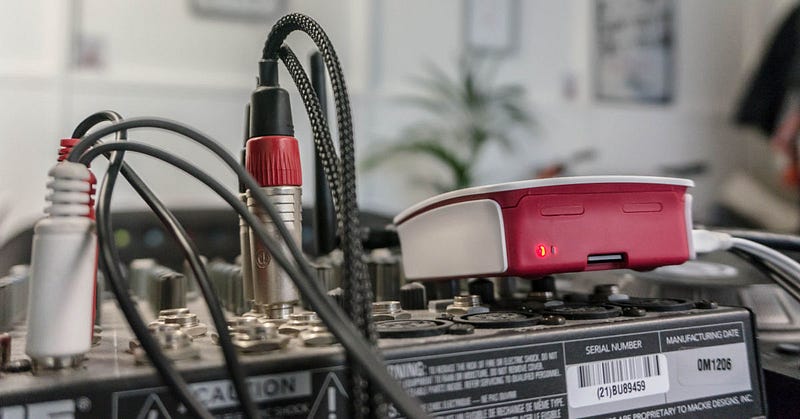
Buy it, plug it, play it
The Raspberry Pi is a credit card–sized single-board computer developed with the intent to promote the teaching of basic computer science in schools and developing countries. It has gained popularity as a supplementing device especially due to its size and low amount of power demand hence making it ideal for interacting with the environment.
The plan was to connect the Raspberry Pi to our speakers to play sounds from it. Our speakers are set up through a mix deck which means it would be just a matter of connecting the Raspberry Pi to it in order to make any output sounds available while maintaining our office music sounds.
Slack allows you to define outgoing webhooks or even slash commands. For instance, you could define the following command:
After that you need to tell Slack to which endpoint it should post the data as soon as someone enters the command. Maybe you can already guess how everything fits together.
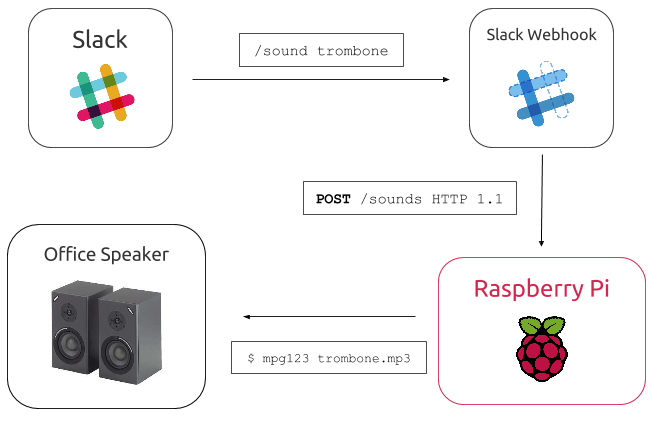
We let Slack post that message directly to our Raspberry Pi which then in turn would trigger the sounds using [mpg123](http://www.mpg123.com/).
path = config.SoundsDir + track + ".mp3" cmd := exec.Command("mpg123", path) go cmd.Run() message := fmt.Sprintf(":speaker: *%s* is playing _%s_", user, track) sendChatResponse(message, channel)
For that we built a web server Huck 9000 (name inspired by our patron saint Mick Hucknall) using Go which parses the different HTTP messages and translates them into Linux commands to be executed on the Raspberry Pi.

It is such a simple setup but if you think about it opens up so many possibilities in terms of extensibility: setting up a timer to play coffee sounds when the brew is done, connecting it to our office TV and show a random GIF on every /giphy or even detecting the song which is currently played on the speakers and posting it back to Slack. We already use it to gather everyone for our daily standup:

Feel free to take a look at the implementation as we have open sourced the code. Clearly, these are just simple and fun things but they enable you to think in a creative way about your workplace and even though it does not directly improve our product it heavily improves our day to day happiness and you never know when one of these hacks lead to another innovative idea as well.
Originally published at tech.mixlr.com on April 4, 2016.
