
Update 9/2/2016: This post has now been updated with the latest versions of Soundflower, which should be compatible with recent versions of Mac OS X. More info.
What is Soundflower?
Soundflower is a free Mac utility which passes audio between different applications. It allows you, for example, to send live audio from applications such as Traktor or Ableton Live into the Mixlr app.
When would you need to use Soundflower?
Use Soundflower to route audio between applications, without using physical cables. In particular, use it to send audio from mixing applications into the Mixlr app, to broadcast live.
Follow the steps below when using Soundflower:
1. Install Soundflower Download and install Soundflower. You may need to restart your computer if the installer asks you to.
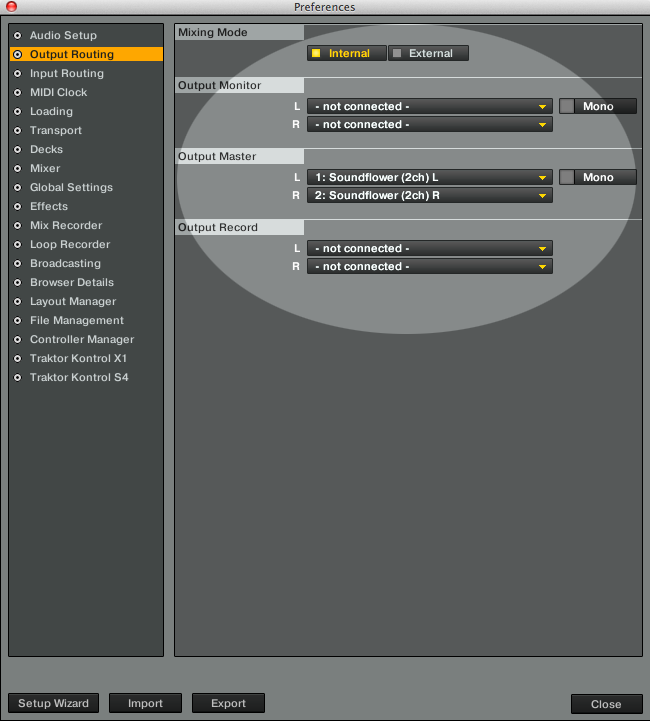
2. Configure your audio app Set up your audio app to use Soundflower as audio output. This is usually accomplished in the audio preferences or settings. Just select Soundflower (2ch) as your audio output.
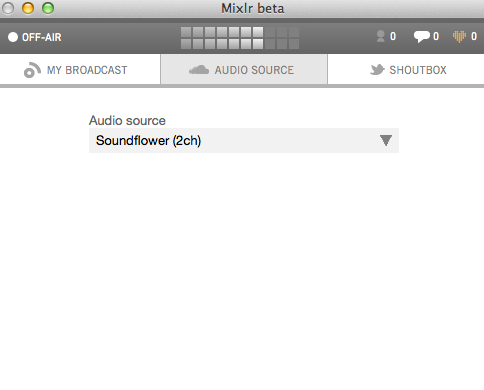
3. Setup Mixlr app Within the Mixlr app, select Soundflower (2ch) as your audio source.
4. Optionally set up monitoring If you now can’t hear anything, try monitoring through the Mixlr app. Open the preferences, and select Built-in Output.
5. Go live and enjoy!
